
Widtrack Cargo Tracker
Widtrack offers seamless shipment tracking with real-time updates, document management, and client notifications. Its intuitive interface enhances operational efficiency, reduces errors, and supports eco-conscious logistics through digital documentation. Experience smarter cargo handling tailored for modern supply chains.

How Widtrack Works
Explore each stage of Widtrack’s intuitive process to effortlessly track shipments, manage documents, and keep clients informed.

Step One: Setup and Integration
Begin by connecting your cargo data and integrating Widtrack’s platform seamlessly into your existing workflow to ensure smooth operation.

Step Two: Real-Time Monitoring
Activate live tracking to monitor shipments instantly, receive updates, and manage documentation with ease throughout transit.

Step Three: Client Updates
Keep your clients informed with automated notifications, transforming shipping transparency into an enhanced service experience.
Discover Widtrack’s Cutting-Edge Tools
Dive into the innovative features that set Widtrack apart, optimizing cargo tracking, document handling, and client communications for unparalleled efficiency. P.S: This is a preview of the platform currently in development.
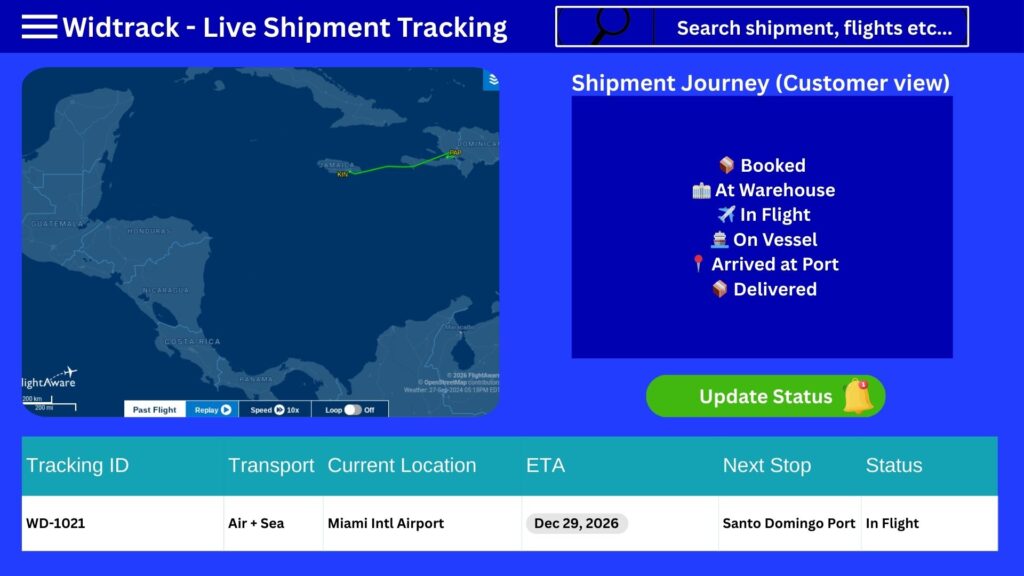
Real-Time Tracking System
Real-Time Tracking System of Widtrack
Overview:
The Real-Time Tracking System of Widtrack is an advanced solution designed to provide accurate and instant tracking of assets, vehicles, or personnel. Utilizing cutting-edge GPS technology combined with reliable communication networks, Widtrack ensures continuous monitoring and real-time data updates to enhance operational efficiency and security.
Key Features:
- Real-Time Location Updates: Offers precise positioning with frequent updates to keep track of movement instantly.
- User-Friendly Interface: Intuitive dashboard that displays real-time maps, status, and historical data.
- Geofencing: Set virtual boundaries and receive instant alerts when tracked objects enter or exit designated areas.
- Multi-Device Support: Compatible with smartphones, tablets, and desktop computers for versatile access.
- Alerts and Notifications: Customizable alerts for speeding, unauthorized stops, route deviations, or other events.
- Data Analytics: Comprehensive reporting tools to analyze movement patterns and improve decision-making.
- Secure Data Transmission: Employs encryption and secure protocols to protect tracking information from unauthorized access.
- Integration Capabilities: Easily integrates with existing management systems and third-party applications.
Applications:
- Fleet Management: Monitor vehicle locations, optimize routes, and improve fuel efficiency.
- Asset Tracking: Secure valuable equipment and inventory with real-time visibility.
- Personnel Safety: Ensure the safety of employees by tracking their locations during field operations.
- Logistics & Supply Chain: Enhance transparency and coordination across delivery networks.
Benefits:
- Increased operational efficiency through timely information.
- Enhanced security and theft prevention.
- Better resource allocation and reduced operational costs.
- Improved customer satisfaction by providing accurate delivery times.
Widtrack’s Real-Time Tracking System is an indispensable tool for businesses seeking to leverage location data for smarter, safer, and more efficient operations.
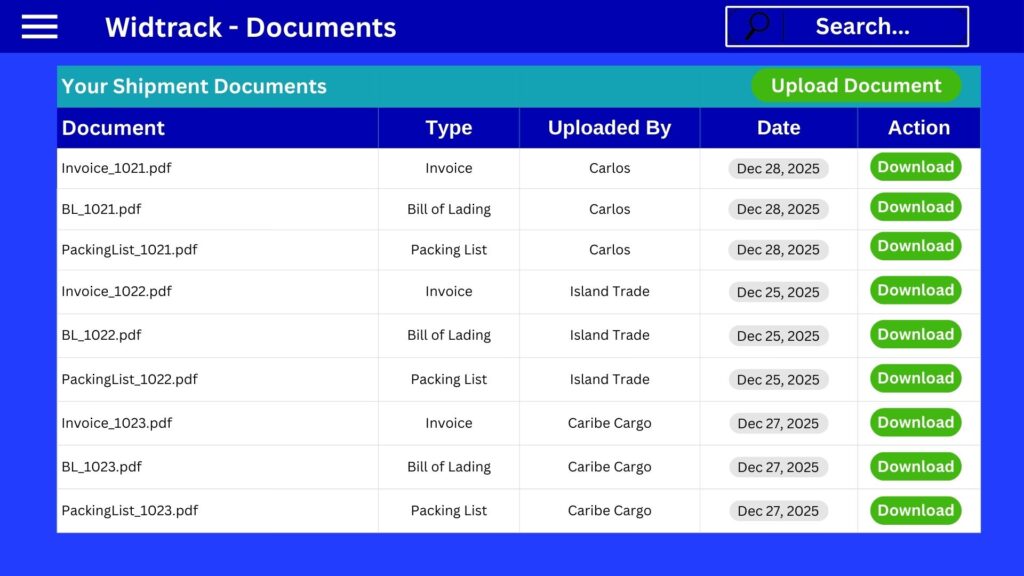
Monitoring Document Management
- Logs all access events, including who accessed a document, when, and what actions were performed (view, edit, delete).
- Helps identify unauthorized access or suspicious activities.
- Tracks changes made to documents over time.
- Allows rollback to previous versions if necessary.
- Ensures that the latest and approved version is always available.
- Monitors the total storage used by documents.
- Alerts when nearing storage limits to avoid disruptions.
- Provides reports on document growth trends.
- Ensures documents are encrypted both at rest and in transit.
- Monitors adherence to retention policies and regulatory requirements.
- Generates audit trails for compliance verification.
- Tracks system uptime and response times for document retrieval.
- Identifies bottlenecks or issues affecting user experience.
Widtrack offers customizable dashboards to view real-time monitoring data, generate reports, and set alerts for critical events related to document management.
- Regularly review access logs to detect anomalies.
- Set up automated alerts for unauthorized access attempts.
- Schedule periodic audits of document versions and storage usage.
- Ensure backup and disaster recovery processes are monitored and tested.
Effective monitoring of Widtrack’s document management system enhances security, compliance, and operational efficiency, helping your organization maintain control over its critical documents.
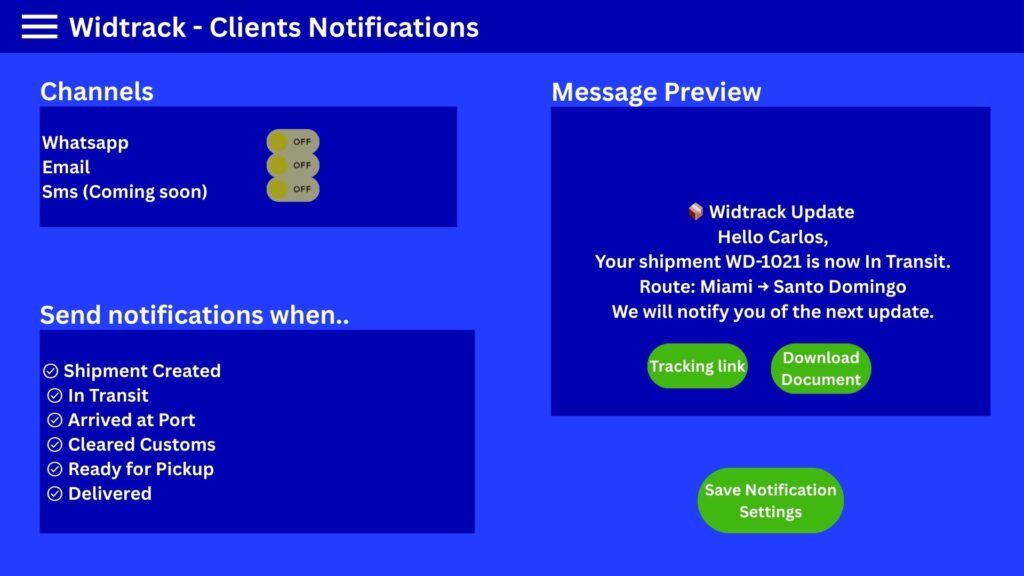
Client Notification System
Client Notification System of WidTrack
Overview:
The Client Notification System of WidTrack is designed to keep clients informed and engaged by delivering timely and relevant notifications. This system enhances communication efficiency between WidTrack and its clients, ensuring that important updates, alerts, and messages are received promptly.
Key Features:
- Real-Time Notifications: Clients receive instant notifications about account activities, updates, and important events.
- Multi-Channel Delivery: Notifications can be sent via email, SMS, and in-app messages to ensure maximum reach.
- Customizable Alerts: Clients can personalize notification preferences according to their needs and interests.
- Automated Scheduling: The system supports automated sending of recurring notifications, reminders, and follow-ups.
- Secure Messaging: All notifications are transmitted securely to protect client data and privacy.
- Analytics and Reporting: WidTrack can monitor notification delivery rates, open rates, and client engagement for continuous improvement.
- Integration Capabilities: The system seamlessly integrates with WidTrack’s CRM, support ticketing, and other backend systems for synchronized communication.
Benefits:
- Improves client satisfaction through timely and relevant communication.
- Reduces response times and enhances service efficiency.
- Enables proactive client engagement and issue resolution.
- Supports compliance with communication and data protection regulations.
How It Works:
- Event Trigger: Specific events or actions within WidTrack trigger notifications (e.g., account changes, billing alerts).
- Notification Generation: The system generates the appropriate message based on predefined templates and client preferences.
- Delivery: Notifications are dispatched through selected channels.
- Confirmation & Tracking: Delivery status and client interactions are tracked for reporting and follow-up.
Conclusion:
WidTrack’s Client Notification System is a vital tool for maintaining transparent and effective communication with clients, fostering trust, and enhancing overall service quality.
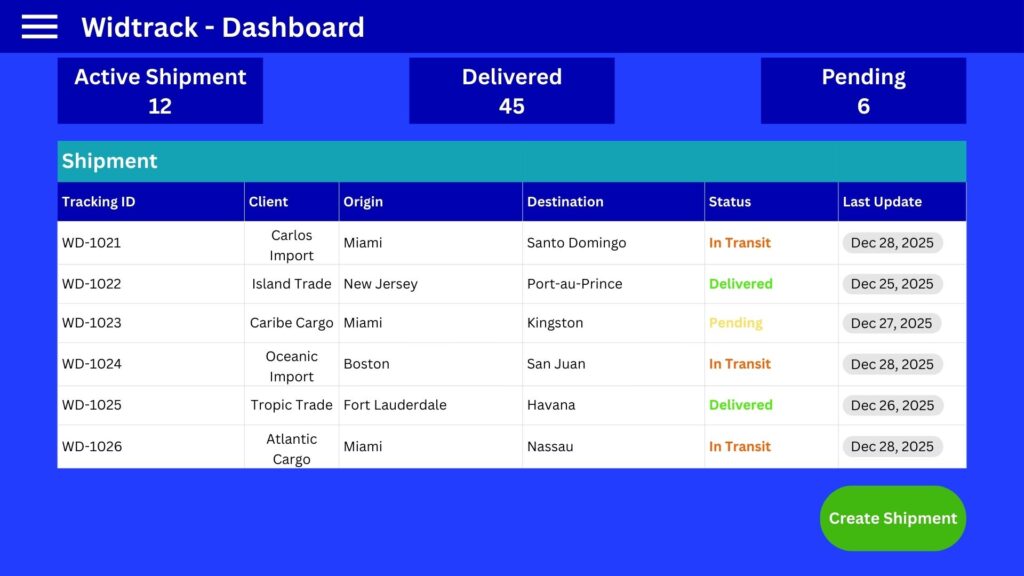
User-Friendly Dashboard
Widtrack User-Friendly Dashboard
Overview:
The Widtrack dashboard is designed to provide users with an intuitive and efficient way to monitor and manage their data. It offers a clean interface with easy navigation, ensuring that both beginners and advanced users can access key information quickly.
Key Features:
- Clean Layout
- Organized sections for different data types
- Minimalist design to reduce clutter
- Responsive design compatible with all devices
- Real-Time Data Visualization
- Interactive charts and graphs
- Live updates to keep information current
- Customizable widgets to focus on relevant metrics
- Easy Navigation
- Sidebar menu with clear labels
- Search functionality for quick access
- Breadcrumbs to track navigation path
- Customizable Settings
- Personalize dashboard appearance
- Set alerts and notifications
- Choose preferred data display formats
- User Management
- Manage multiple user profiles
- Assign roles and permissions
- Track user activity history
Benefits:
- Enhances productivity by centralizing information
- Simplifies complex data through visual tools
- Improves decision-making with up-to-date insights
- Adapts to user preferences for a personalized experience
Getting Started:
To begin using the Widtrack dashboard, log in with your credentials, explore the default layout, and customize widgets to suit your needs. Utilize the help section for tutorials and support.
Widtrack’s user-friendly dashboard empowers you to stay informed and in control with ease.
Affordable Plans and Pricing Options
This section provides details about our pricing options, highlighting the value and benefits of each plan.

Simple (Postpaid)
$1 = 1 tracked package
Pay as you ship

No monthly fees
No hidden charges
You don’t ship, You don’t pay

Start Simplifying Your Cargo Tracking Now
Discover how Widtrack’s cutting-edge software enhances shipment visibility, document control, and client communication. Join early adopters to transform your logistics workflow today.